Showing posts with label Gmail. Show all posts

Google Labs Expanded

Google has a large number of employees that are always creating new technologies. While there are the already stablished services from the company, such as Gmail, search, and youtube, there is always something new and cool that Google is working on.

To give more prominence to this work, Google is doing a revamp of its Google labs. The web site existed for a long time, and it was a kind of incubator for cool projects that Google had not commited to for completely.

Total Revamp

The revamped Google Labs website is now a much larger directory of technologies that will be available from the company. Most of them are targeted a developers, and provide application programming interfaces (API) for existing services, such as Gmail and Photo search.

There are also innovations targeted at end users. For example, take the new search me
service that was released yesterday. It is now much easier to find such gems of technology, since the search and categorization functions have been greatly improved.

Related Articles


Basecamp

View PDF files on Gmail

PDF files are an awkward format for distributing content on the web: PDFs are of excellent quality, and easy to read and print, but they are also considered a nuisance when you need to visualize information quickly. 
Usually, to see a PDF file you need to request an application external to the web browser (a PDF reader plug in). But loading the application frequently takes much more time than loading a single web page.
PDF files also have the tendency to keep accumulating on the hard drive -- most of the time without any practical use. Thus, you end up with a lot of PDFs spread over your hard drive, and especially on the download folder.
Using the PDF Previewer in Gmail

A solution to some of the problems mentioned above has been implemented in Gmail. It is in the form of a quick previewer, that allows anyone to see the contents of a PDF file witout having to open Acrobat reader or similar programs.
If you receive an email in your Gmail account that contains a PDF attachment, you have the option to quickly preview the file. When you click view PDF, instead of loading an external application, Gmail will simply open a web page with some images displaying each of the pages of the document.
PDFs and GoogleDocs
The effect of previewing PDFs is not new if you ever used Google documents. For example, you can just as well load a PDF on Google documents and do the same manipulations. 
The difference however is that, by clicking on the Gmail like, the document will be loaded into Google docs directly from Gmail.
Further Reading

Adding a Twitter Gadget to Gmail

If you use Gmail, it is possible that you haven't notice, but Gmail supports now the addition of gadgets to its left bar. You can choose hundreds of gadgets to add, among the list maintained by Google in its iGoogle page.
From this large number of gadgets, one of special interest is the twitter gadget. If you are a twitter user, you may have the twitter web page open during the whole day. Or you may be using a separate application, such as twhirl to see your twittts.
Gmail now supports twitter using the twitter Gadget. You just need to add the gadget link to the list of gadgets in Google labs, and it will be installed. Now it will be easier than ever to keep in contact with you twitter friends through Gmail.


Gmail little know tips from Google

Gmail is a well known web 2.0 application that can handle all types of email needs. I personally use Gmail to read and write email daily, and I am very satisfied with is user experience. However, like all web 2.0 services, Gmail is not static. It is evolving nicely, and almost every month there are a few new features that are worth of notice.

Google has recently stressed some of these nice features that are almost forgot, but that can improve the user experience to whole new levels. Among them are:

  • Dynamic update of messages: when a new message in your current thread is received, Gmail now presents a little information, which allows you to reload the list of messages in your conversation.
  • Replying by chat: this gives everyone the opportunity to interact in real-time. If you want to talk to your buddies, instead of just leaving a cold email message, you have many more opportunities with this feature.
  • Attachment handling: The is one of the most interesting features of gmail for me. Whenever I see a MS word or pdf attachment, I don't need to download them and call my local viewer. Gmail can show a web-based version of those files, so I can quickly decide if they are interesting or not. No virus, not additional time spent.
And, of course, the storage space is still always increasing...

What do you think is the most interesting feature of Gmail?

Technorati Tags: ,

Google Groups: updated and better

Google groups is the service that allows the creation of email groups. It has been up for a few years now, and supports a lot of activities such as reading, posting, and creating your own group.

Google groups is now with an improved interface. The company decided to add a nice look and few, that is more similar to the yahoo approach than the traditional "text only" method used by Google. The information now seems to be easier to find, definitively.

Another important change is the addition of features only found in Gmail, such as the threads of messages listed as foldable items. This improves significantly the process of reading and answering messages.

It seems to be a very good improvement over the older interface. If Google continues to provide such face lifts for their other services, it will certainly help improve their visibility on a larger user base.

Link

Google add applications for your domain

What happens when Google decides to package some of its services to businesses? The media starts to talk loud about how Google is trying to steal the market of Microsoft. It might very well be this, but by now it seems that they are just trying to position themselves as a good alternative for Internet access.

Today, Google announced that some of their most famous applications (Gmail, Gtalk, and Google calendar) will be available in a package that can be used by corporations as if it was part of its intranet. The web apps can be customized using the corporate logo, and the url of the company.

It looks like an exciting opportunity to Google, but also for other companies that are trying to maintain their web services. With help of Google, it seems that this will become increasingly easier.

Link

Technorati Tags: , ,

Google spreadsheet showing promise

Google is the heavy weight of search, but not so much in the realm of productivity software. Despite the successful launch of some software such as gmail, Google is still trying to find its way in the area of office software.

It is, however, trying hard. Only this year we saw Google buying writely, a novel company with a online service that imitates Microsoft word. Now, they released an online spreadsheet, called, for lack of better name, Google Spreadsheets.

First, we should say that the service is not a replacement for excel, especially if you are a heavy user of more advanced features. However, Google spreadsheets has some nice features, of which I think the more appealing are:

1 - Allow easy sharing of spreadsheet information. You couldn't do that with MS office easily, since excel documents need a copy of excel installed in any computer they will be viewed.
2 - Allow simple computation without excel. In the past, just to do some quick calculations I need to open MS excel. Now, I can just do it easily by clicking on a link to Google Spreadsheets.

It is not much, but I think it is enough to keep people interested in the product and make it grow. Google knows how to improve products incrementally, as it has done with Gmail, and Google Maps. I think Google Spreadsheets will follow a similar pattern. Maybe we are seeing an excel killer just in its infancy...

Technorati Tags: ,

Integrating you agenda with Google Gmail and Calendar

Google has recently released a new application that is gonna help all of us that need to keep dates, events, meetings, and other time-related data in our jobs. The Google calendar is a great new web application that allows users not only to keep information, but to share data with friends and collaborators.

Using Google calendar, you can enter events on the daily, weekly, and monthly views. You can also integrate your calendar with Gmail, by sending reminders, daily lists of events, etc.

In the next posts, I will provide more information about Google calendar and how it can help you to get organized and never forget a scheduled meeting anymore!

Link

Technorati Tags: , ,

Google releases Gmail notifier for Mac

Google has been faster than ever in releasing and supporting software for Mac OS X. Now it is the time of an improved Gmail notification program for the Apple platform.

The new Gmail notifier has been released today. The previous Google Gmail notifier was had a menu in the main task bar, but it was too crude. The new version has improved graphics, and it is integrated with the notification the Growl notification system. It is really a nice addition to the Google software pack for Mac.

Link

Technorati Tags: , ,

Google launches new Mac OS Widgets

If you are a Mac addict, it should be received with great pleasure the fact that Google is developing more and more software for the Mac platform. Although windows still dominates the scenario of computing on Google -- with toolbars, image software, among others -- Mac products have been released. The major example is Google earth, that was released last month.
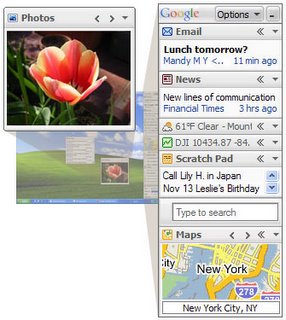

The latest news is that Google is lauching their first Mac Widgets. Created by some Google engineers in their "free" time, these widgets help the Mac fan to stay in touch with Google products using their APIs.

The Widgets released are Blogger (where this post was originally written), a widget for Gmail, and another for search history.

Link via Google blog

Technorati Tags: , ,

A Google desktop in your computer

With the launch of the Google desktop 3.0, Google is making a clear statement about its desire to conquer your desktop. The company is not only developing the best web services, they also want to provide the best desktop productivity tools.

To make this statement clear, Google announced this week a serious upgrade to its desktop search, which is now much more capable. The main improvements are in two fronts: the looks and the search functionality.

The look-and-feel of Google desktop 3.0 has been improved, and now it supports content created by third-party developers, thanks to the recently released Google desktop API. Plug-ins can be created to provide indexing for new file types, helpful applications, or just to implement a cool game such as tic-tac-toe. This make Google desktop much more capable of adapting to the needs of its users.

The second area, desktop search, has been completely revamped. Now, users are allowed not only to search files locally, but also saving this information in the Google servers, so that they can access the data from any computer they may be connected. The end result is having a copy of your files with you at any time, so you can consult your information from anywhere in the world, just entering your Google password.

All this flexibility has a price, however: you must be willing to let Google keep your information in their servers. Although this may look scary for some people, its not so bad if you consider that everything that you receive by email (if you use a Gmail account) or that you search in the web is already archived with Google. The feeling of total privacy these days may look as distant as it has ever been. Remember, however, that since the Internet was created all your information is in some way handled by servers you do not control...

Anyway, Google desktop 3.0 is an extremely interesting piece of software. Even if you don't want to use all its features, it will provides much better functionality than the previous version, and this is certainly a good reason to update.

Technorati Tags: , ,

Google provides email for institutions

Gmail has been a very reliable and friendly email tool for millions of web users. The advantages of the search strategy for organization and the large amount of available memory have made Gmail the service of choice for most users.

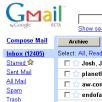
Now, Google wants to make gmail available not only for personal users, but also for companies. The first test of the new option was announced today in the Google blog:

San José City College (SJCC) has embarked on a technology improvement program, and for the first time will be offering student email accounts. That's where we come in. We're testing a new service with the school by hosting Gmail accounts with SJCC domain addresses (like student@jaguars.sjcc.edu), plus admin tools for efficient account management. Massive storage and features that tame the most unruly inboxes, like powerful mail search, conversation view for messages, and a fast interface, make Gmail very handy for students.
Not only the San José City College can take advantage of this, however. Any company can request Google to become its email host. Even the web address of the email will follow the domain structure of the original institution. This means that companies can have for free the access to an industrial strength email system -- just for the amount of new page view that will be generated for Google.

Technorati Tags: , ,

Google launches Gtalk on Gmail

As we have been mentioning previously, Google is integrating Gmail and Gtalk using a common interface to allow Gmail users to connect to their Gtalk accounts. Now Google is confirming that the new feature will become available in the Gmail web site starting in the next few days.

According to the Google blog:

When we launched Google Talk, some people told us what a great idea it'd be to add chat to Gmail. True that. So a couple of us Google Talk engineers approached the Gmail team. They were excited about the idea, and we got to work immediately -- spending a lot of not-so-lazy Sundays huddled in a conference room.
So, as the result of the Sunday meetings of Google's engineers we will have access to Gtalk from our email accounts. This looks like pretty good work!...


Related posts:
Google integrates Gtalk and Gmail
Quick update: my account now shows that Gtalk conversations can be saved in the Gmail account. The contacts and chat windows is still not available -- according to the status message it is "comming soon".

Technorati Tags: , , ,

Google integrates Gtalk to Gmail

Img

Google talk has been introduced by Google last year as a new way of doing instant messaging. While it has not been so different from other applications from Yahoo, Microsoft, and AOL, Google is planning to make a complete new move with Gtalk: integrate it with the popular gmail service.
Google announced today that it will be integrating functions of Gtalk with gmail, which would effectively become a unique application. The goal is to increase the capability of gmail beyond the helm of email. At the same time, the new functionality would add new users to the new Gtalk service.

It seems that an integration like this would be beneficial for gmail users. Although it is not clear how the integration will be, it looks like Google will expand on the idea of "conversation" that is used in Gmail is a metaphor for the exchange of message.

In my case, such feature would be a blessing: I have having to run a separate program for IM. Now with gmail integration I feel that I will have more opportunities to collaborate and talk with people without worrying about the software being used.

The new feature is suppose to be launched Tomorrow, so let us hope Google is doing the right thing again...

Technorati Tags: , ,

Google updates Gmail

As I mentioned previously in a post about Gmail, Google is simplifying its email client. Now, officially, your can delete mail using a direct "delete" buttom from the Gmail toolbar.

Link via Official Google Blog.

p.s.: Notice that this is probably the most discussed toolbar button in the whole history of the blogosphere!

Technorati Tags: , ,

Google Gmail makes it easy to delete messages

Gmail provide great features to organize the pile of messages we receive everyday. However, there are always some aspects of the program that can be improved.
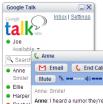
This time, Google is changing the way we can delete undesired messages. A new button is being added to Gmail toolbar that can delete a message directly.

Before this, deleting a message was an option hidden into the drop box of the toolbar: not so intuitive for novice users, and harder to use for experience ones. So, the new feature will certainly made Gmail easier to use for everybody.

Link via ZDNet.

Technorati tags: ,

GTalk online status on you web page

Google Talk is becoming more popular, and if you use it you certainly want all your friends to know that you are on line and willing to talk.
To partially solve this problem, Jon Burrows has developed a nice service called Gtalk Online Status Display.

At this point, it is a no thrills service: to enroll you just need to send the developer a Gtalk invitation at gtalkonlinestatus@gmail.com. Then, you will receive a status number that you can link to an html tag in your web page. The script you return an image that says if you are currently online at Gtalk.

It looks very interesting, and hopefully the service will be made more robust in the near future.

Technorati tags: ,

Gmail drive


What if you could have a hard drive available through the Internet, with more than 1GB of space? You may think you would need a lot of money for this... In fact, this is not the case: remember, you have gmail. And it is for free!

Gmail has more than 1GB of available space. This is mainly used to store email data, but nothing prevents someone smart to use it for other means. This is what a smart guy called Bjarke Viksoe did. He designed a software to access the free space in Gmail as an online drive. You can use it to store any kind of information, and have access to it from anywhere.

The software is freely available for the Windows platform. You should get a copy of it see how nice it is.

Gmail adding virus protection

If you are a heavy user of gmail, you mail have missed the ability of scanning attached files against virus. In a web infested of virus that arrive everyday by email this is a must have, and other free services such as yahoo have provided this feature for already some time.

The only reason why this was not so bad with gmail, is that it has a very decent system to catch unwanted message, including spyware and other beasts. Now, gmail closes the cycle by adding virus protection to its email users. It is a welcome feature that will certainly make the gmail users even more productive with their email reader.

Gmail now supports web clips

Google really doesn't stop improving its gmail service. After the introduction of antivirus detection last week, this time they are adding additional cool information to user accounts, using a feature called webclips.

Webclips is a new panel in gmail that can be used to display dynamically loaded information. In its implementation, this is similar to the ad panel, which displays ads based on the content currently loaded in the main mail reading window. However, this new feature allows information to be customized by the user.

This means that from now on gmail users can have access to additional sources of information, such as xml feeds from blogs, news sources, weather services, etc. In fact, any RSS or Atom feed can be incorporated using this new feature.


Google
